- Published on
Vue - The Application Overview
In this article, the application overview best practices will be explained.
Introduction
Before starting the Vue.js based project development, you need to know the Vue ecosystem and its component anatomy first.
Ecosystem
Vue ecosystem is composed by official core libraries, developer tooling support, and many other third party plugins.
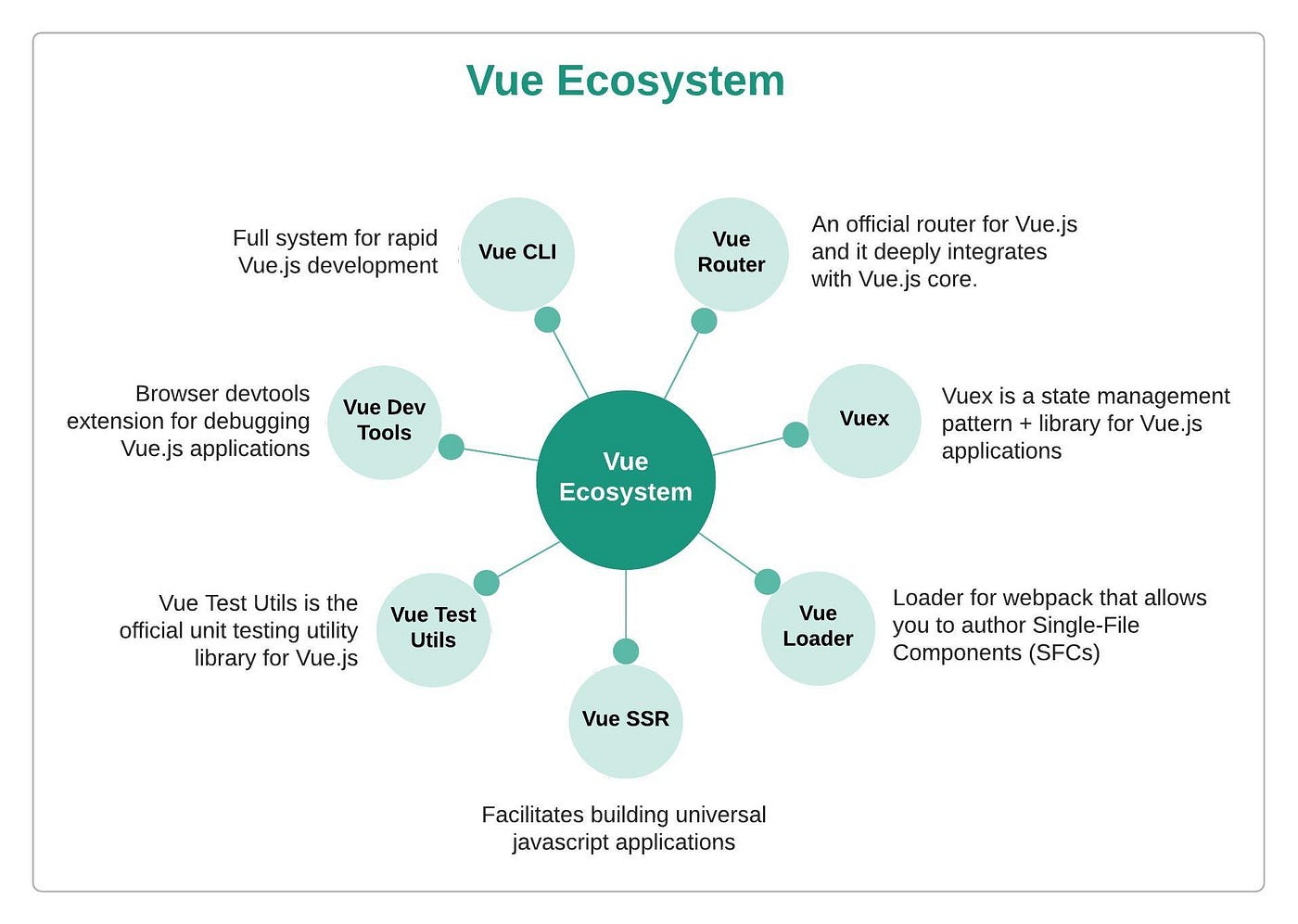 Some of the core libraries maintained by Vue team are as follows:
- Vue Router: The official router for Vue.js. It deeply integrates with Vue.js core to map our components to the routes and render them.
- Vuex: Vuex is a state management pattern and library for Vue.js applications. It serves as a centralized store for all the components in an application.
- Vue Loader: A loader for webpack that allows you to author Vue components in a format called Single File Component (SFC).
- Vue DevTools: Devtools extensionin the browser for debugging Vue.js application.
- Vue Test Utils: The official unit testing utility library for Vue.js application.
- Vue CLI: A full system for rapid Vue.js development that aims to be the standard tooling baseline for the Vue ecosystem.
- Vue Server Renderer: Build isomorphic or universal JavaScript applications which runs both on server and client side where majority of the application code is shared and reused.
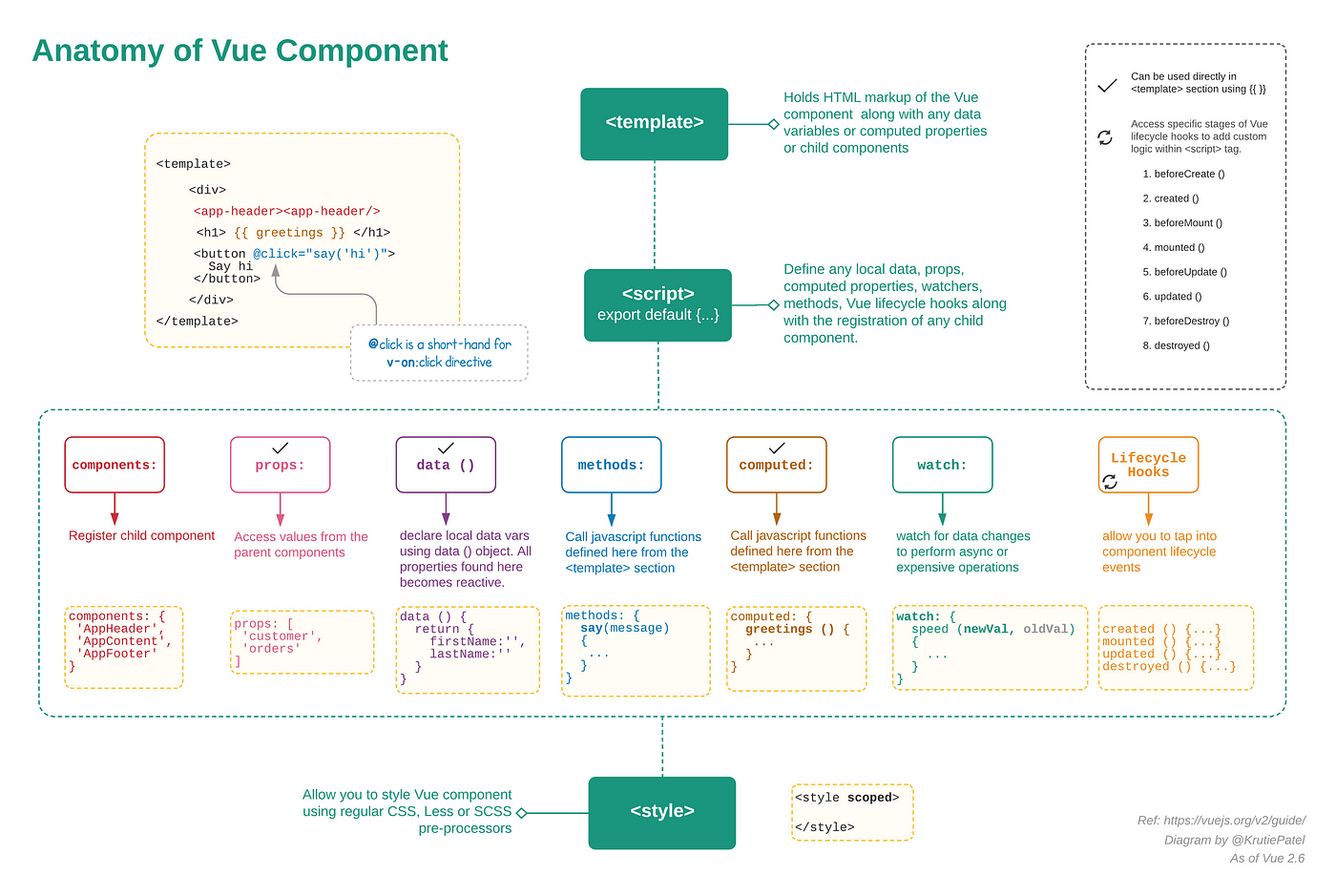
Component Anatomy
Learning the anatomy of a Vue component and its lifecycle hooks will kickstart your understanding on how the component works. Here is a gist of the skeleton component and below is the representation of the basic anatomy of a Vue component.
Get Started
The application is an XBase application. Prerequisites
- Node 14+
- Yarn 1.22+ To set up the app execute the following commands
- Container Application
git clone https://stash.xtremax.com/scm/xapp/xtremax.base.webapp.git
cd xtremax.base.webapp
git checkout -b develop --track origin/develop
yarn install
yarn serve
Runs the container application in the development mode. Open http://localhost:8080/ to view it in the browser.yarn build
Builds the app for production to the dist folder. It correctly bundles Vue app in production mode and optimizes the build for the best performance. The build is minified and the filenames include the hashes. - Micro-frontend Application (e.g. Audit Trail Module)
git clone https://stash.xtremax.com/scm/xapp/xtremax.base.audittrail.webapi.git
cd .\xtremax.base.audittrail.webapi\Xtremax.Xbase.WebApp.AuditTrail\
git checkout -b develop --track origin/develop
yarn install
yarn serve
Runs the micro-frontend application in the development mode. Open http://localhost:8081/ to view it in the browser.yarn build
Builds the app for production to the dist folder. It correctly bundles Vue app in production mode and optimizes the build for the best performance. The build is minified and the filenames include the hashes.
- Author
- Label
- Author
- Name
- Gingsir Pradipta, Rudy Prihantoro