- Published on
Vue - Performance
The primary and foremost reason any developer can think of the factor that affects the app's performance is bundle size. The larger the bundle size, the slower the Vue.js application performance. Thus we can conclude that bundle size is inversely proportional to the application performance.
These are some of the common reasons of poor performance behind a Vue.js application:
- Not using third-party libraries wisely
- Overlooking Code Splitting and Lazy Loading
- Unwanted hits to API requests
- Not structuring JS and CSS files properly and this Vue - Performance topic will covers some of the best practices to improve the performance.
Minimize the use of external libraries
Use third party libraries wisely!
If your project depends on many dependencies, the code that you write by yourself maybe just a small piece of your production bundle. Since a simple library, can in fact, contain more code than your whole application!
We usually do a lot of different optimizations in our own code hoping that they will make our apps faster, when in reality it’s not our code that makes them slow - it’s others code! This is why choosing your third-party libraries wisely is a key to build well-performing web applications.
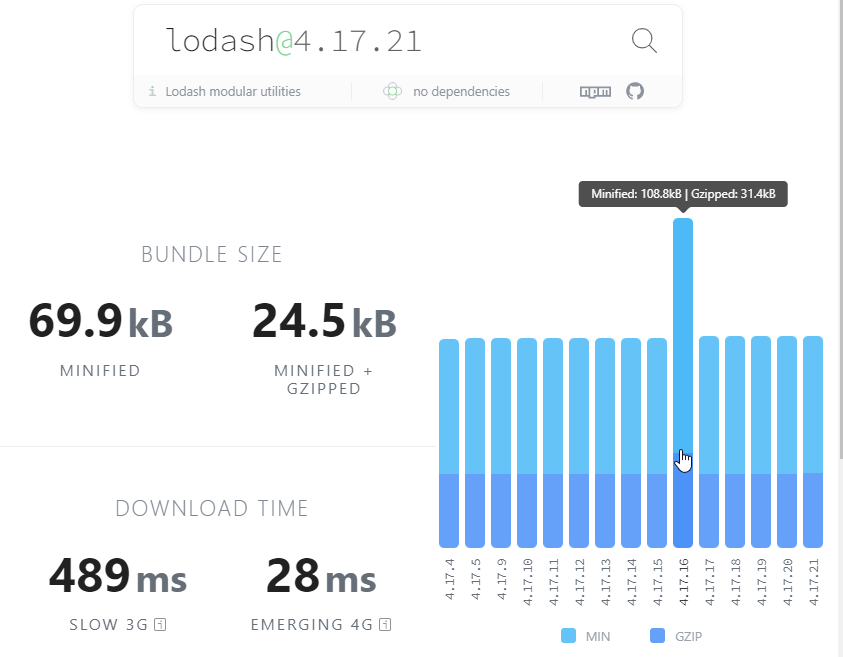
You should consider to check the package in this Bundlephobia website before adding it as a dependency to your project.
Generating a build report will give you a visual description of the sizes of various packages used upon building a Vue.js app. Further, you can figure out how to replace any package which takes more space than expected.
For example, webpack-bundle-analyzer is a tool suitable for this job. You can use the command build –report for generating the report of your application.
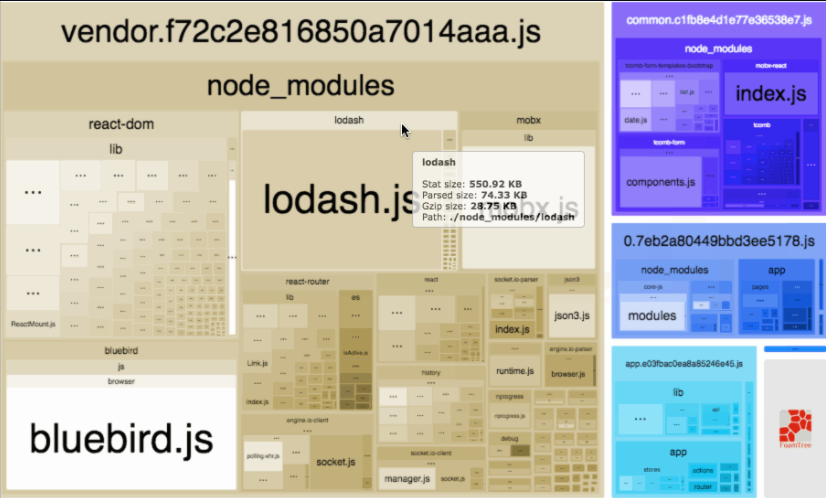
Finally, a small act that could create a significant and noticable impact is importing only the required utility from a package.
Stop Importing Whole JavaScript Packages
For example, if you are using a few functions from Lodash :
// instead of importing the whole package,
import lodash from "lodash";
lodash.uniq(param);
// consider importing the required functions only
import uniq from "lodash/uniq";

uniq(param);
This article will give you more insight on how to optimize the third party libraries: Vue.js Performance - Optimizing third-party libraries.
Code splitting and lazy loading
Code splitting is a technique of splitting production JavaScript into smaller files, thus allowing the application to be only partially downloaded. Any unused code will not be downloaded until it is required by the application.
Most of the time, code splitting should be done on the routes level, but can also be used for other lazy-loaded parts of the application.
Do not code split everything as it might even worsen your application's performance.
Lazy loading and code splitting in Vue.js
Component and state optimizations
- Do not construct the whole page on a single component. Try to break it down into multiple components according to each section's feature or functionality.
- Keep the state as close as possible to where it is being used. This will prevent re-rendering components that do not depend on the updated state.
- If your application is expected to have frequent updates that might affect performance, consider switching from runtime styling solutions that generate styles during runtime to zero runtime styling solutions, such as tailwind, linaria, vanilla-extract, and CSS modules, which generate styles during build time.
Optimize images
Compress the images
Images contribute a lot to the application’s bundle size. When the app renders the images with considerable sizes, they can actually increase the loading time of the app. What you can do is optimize your way to serve images. And for that, you can locally compress the images or use CDNs.
Use modern image formats
Use modern image formats such as WebP for faster image loading.
WebP is a modern image format that provides superior lossless and lossy compression for images on the web. Using WebP, webmasters and web developers can create smaller, richer images that make the web faster.
According to dev Mozilla, WebP lossless images are 26% smaller in size compared to PNGs. WebP lossy images are 25–34% smaller than comparable JPEG images at equivalent SSIM quality index.
Lossless WebP supports transparency (also known as alpha channel) at a cost of just 22% additional bytes. For cases when lossy RGB compression is acceptable, lossy WebP also supports transparency, typically providing 3× smaller file sizes compared to PNG.
WebP is supported by Chrome, Firefox, Edge and Safari from version 14.
Lazy loading images
In some cases, just compressing media files on the web isn't enough. This is where lazy loading comes in handy again. You should consider lazy loading images that are not in the viewport, by using srcset to load the most optimal image for the client's screen size. Hence, on the initial page load, only media files hat are visible in the viewport are requested; the rest are requested as the user navigates through the application.
If your project deals with media-heavy page, consider using this library to ease your job: vue-lazyload: A Vue.js plugin for lazyload your Image or Component in your application.
Optimize event handling
Considering many of our projects involving user forms that closely related to the user interaction, you should optimize the event handling to improve the app's performance.
In a specific case, a mistaken event handling could lead to triggering unnecessary API calls, thus also adds more load to the back end server.
For example, consider there is a form input that allows the user to type in order to search something from the server:
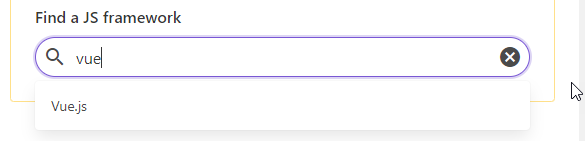
If you make the code to trigger the API call every time the user types something, it could lead to multiple unnecessary API calls. Hence based on the example above, it would call API 3 times with the request payload of "v", "vu" and "vue".
Therefore to optimize the event handling, you should give a little delay for each user-typing event before triggering an API call, by using (for example) Lodash - debounce. Hence it will call API only 1 time with the request payload of "vue" at the end of the user-typing event.
The example above is only one of many others that should be taken into account when you handle an event.
Reuse functionality accross the app
Before writing a code, think about the future possibilities. That's why, the Directory Structure topic doesn't only aim to improve the maintainability, but it has correlation with the performance too. For example, if the function will be used in many parts of the application, you better create a JS file in the utils directory that exports a reusable function that accepts arguments based on the specific needs. This small act, yet again, could significantly reduce the lines of code in your project.
- Author
- Label
- Author
- Name
- Gingsir Pradipta