- Published on
Choosing the Most Appropriate UI to Suit User Needs
We tend to create a beautiful User Interface (UI) with pleasing colours and a great appearance. And yes, our job as UI developers is to create a stunning interface so users can be comfortable and satisfy them when clicking, scrolling, and tapping our apps.
In the development process, a UI developer mainly collaborates with Business Analysts (BA) to build UI and let Back-End (BE) Developers do their job to create an Application Programming Interface (API) that will be integrated later. This separation between UI and BE works best in microservices, where our programmers develop all services independently with loose-couple relationships between them. The downside of this approach may lead the BE Developers and UI developers to be unaware of the needs and impact of each other.
One of the best examples of this issue lies in the following UI:
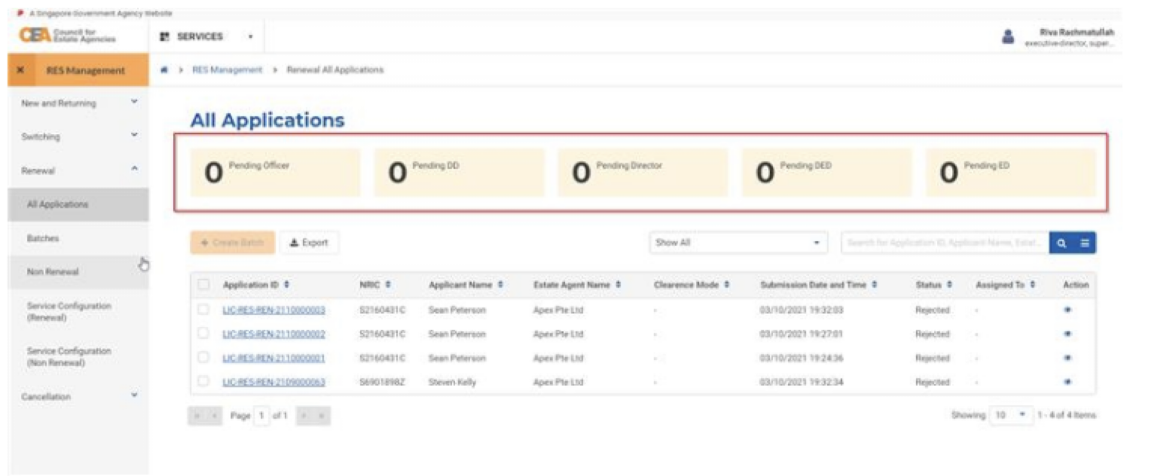
From the perspective of UI developers, that kind of UI is easy and simple. It does not take much effort to implement. On the contrary, BE developers see this kind of UI can raise performance problems since it requires high computation to calculate the whole database and will take longer to load, which is not as expected. Re-architecting the solution will not solve problems like these. The team must round up to re-think the solution, which will take another effort and resources.
Another example of the same situation is pagination. This pagination (image 1) takes another calculation of total data before pagination can determine how many pages are needed.

So, if the total data is not feasible, the team can do another workaround before directing to other possible implementations. The image 2 below shows the pagination method, which does not need any total data calculation. Light in loading and low in computation will be preferable by the team.

But everything comes with its trade-off. The first pagination helps users be aware of what page they are currently on, and they can conclude which page they most likely will find the data they want. While in the second type of pagination is the opposite; they can't do it.
We can conclude that if the user is expected not to think about which page they are, and it won't be effortless for the BE developers to calculate the total data, then go with the simple pagination (image 2). But if we need the user to know what page they are, and the total data is relatively easy to count, then you can choose the default pagination (image 1).
The essential takeaway lies in the preparation. In developing UI, it is crucial to have a technical analysis of the wireframe early to detect a potential issue immediately. Sharing perspectives and points of view with others is critical since everyone has their blind spot. The team should consolidate the same perception about their goals, what they want the user to do or not, and what behaviour is expected from the app.
- Author
- Label
- Author
- Name
- Ilma Fauziyah