- Published on
Deal with Error page
Error page is one of the important page that website should have. Because error pages inform visitors about problems when they attempt to access your site.
Each problem has its own status code (for example, 404 or 503) and error page . The web server automatically provides basic error pages, but the Error Pages interface allows you to define custom error pages for any HTTP status code.
What is a 404 Error?
A 404 error is a standard HTTP error message code that means the website you were trying to reach couldn't be found on the server. It's a client-side error, meaning either the webpage was removed or moved and the URL wasn't changed accordingly, or the person just typed in the URL incorrectly.
For the most part, you can configure your website to create a customized 404 error page.
But first, why’s a 404 page so important? If you don’t create a 404 page, your server can’t provide an adequate response for a resource that isn’t found.
There are two common reasons a visitor might land on an error page
- They hit a link that points to a URL for a page that no longer exists
- They click or type a misspelled link
How to configure error pages in micro-services app?
If your web app is using micro-services that the service can running without another service. Please to create a error page to handle if the page is not exists.
For example:
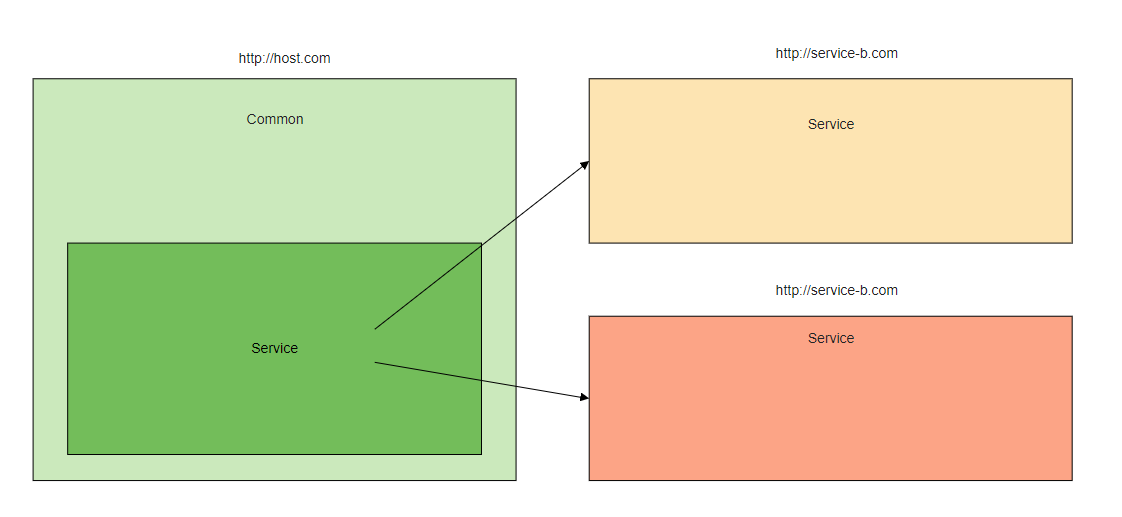
The image above is xbase micro-services architecture that the common app can load the service app but not share the state of each service.
Each service should have error page and common too. So, the router can understand what the website should do if the page is not found.
- Error page in Common
You need to register the not found page in the common router for common if the user go to service prefix but the service is not found.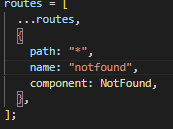
In the vue app, the star symbol (*) is registered for not found page. So, if the user visit service that not found in the app, the router will directly to the not found page. - Error page in Service
You also need to register the not found page in each service for the service it self. If you want every service when got the error page should redirect to common error page, you need to add logic in the hooks of the error page script (ErrorPage.vue) to tell the service to redirect the website to common error page.
In the error page script you need to add validation rule in the created or beforeMount hooks in vue 2 or in the onBeforeMounted in vue 3.
The body of the hooks is to check if the service is running over the common service then redirect to the common error page.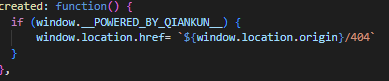
If you want to use the service error page just leave this empty.
What is a 503 Error?
The HyperText Transfer Protocol (HTTP) 503 Service Unavailable server error response code indicates that the server is not ready to handle the request.
Common causes are a server that is down for maintenance or that is overloaded.
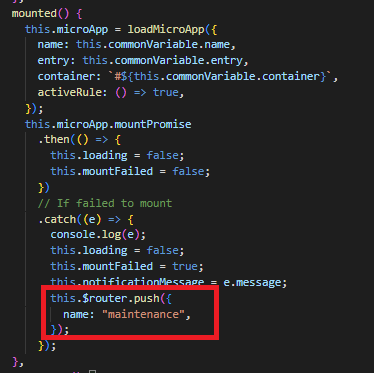
In the micro-services sometimes the services pod is not running or in maintenance. So, the website should tell the user if the service is not ready.
How to configure it
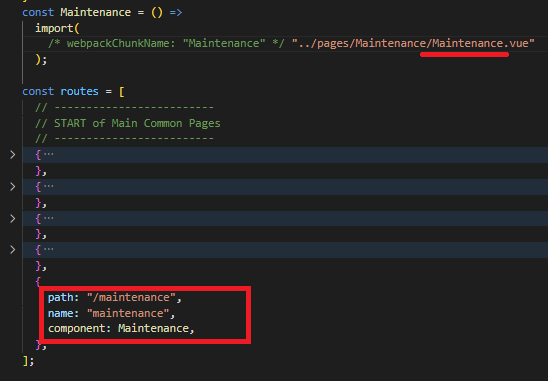
- If you want to add maintenance page, you can just add it in the router using a specific name or it's up to you what it's called.
- update the hooks of the MicroApp component in the common service app.
Before deploy the code to production please make sure the error page can running well. Because sometimes if something happen in production we can't replicate the error in the local machine.
With a creative 404 message you may even find that visitors are more forgiving. Naturally they will be disappointed at not finding content they were promised, but an original or funny 404 page could make up for it. If done properly, error pages do have some potential.
- Author
- Label
- Author
- Name
- Amir Malik